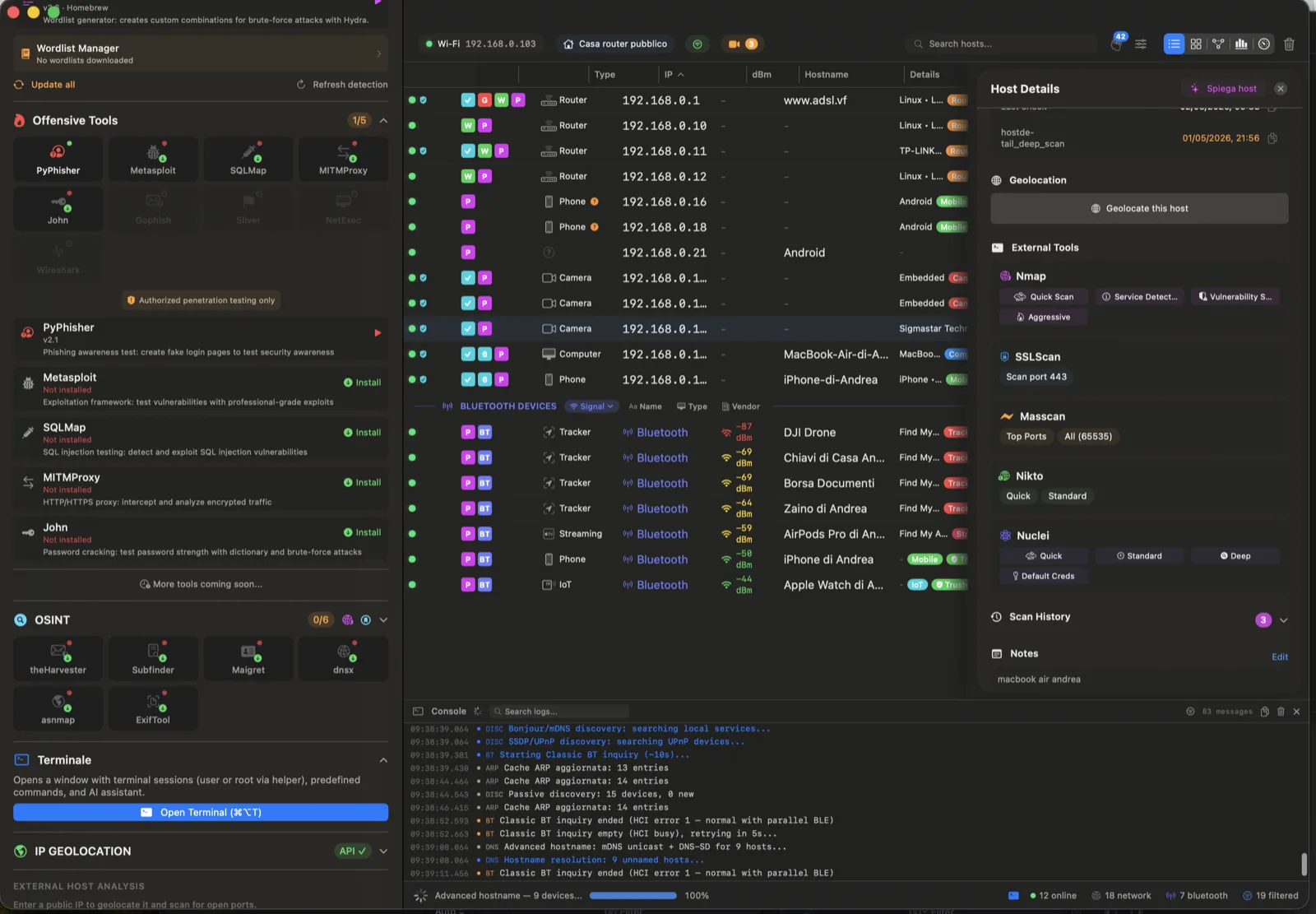
The Privileged Helper is an XPC service that runs alongside Paranoid with elevated permissions, unlocking advanced scanning techniques that require root access. Install it once with your administrator password, and it auto-updates silently whenever you update Paranoid—no repeated password prompts.
The helper is now 100% open source on GitHub — you can read every line of code that runs as
root on your Mac, audit the XPC protocol, reproduce the build, or fork it for your own pentest tooling. We open-sourced it because asking users to trust a closed-source daemon with admin rights is exactly the kind of thing the paranoid (rightfully) refuse to do. The helper enables 23 powerful operations impossible without root access on macOS. For advanced users, this means you can run deeper reconnaissance and
penetration testing checks on macOS while keeping a clean, native interface, a controlled permission model, and a publicly auditable trust boundary.
📡 ARP Scan (libpcap)
Raw ARP request scanning using libpcap for direct Layer 2 device discovery. Finds devices that don't respond to TCP or ICMP, including many IoT devices and network appliances. Significantly faster than TCP-based discovery.
🥷 SYN Stealth Scan
Half-open TCP scanning that sends SYN packets without completing the handshake. Much harder for target hosts to detect and log, and significantly faster than full TCP connect scans. The gold standard for port discovery.
PRO
🌐 UDP Scan
Active UDP port probing that discovers services invisible to TCP scanning: DNS (53), SNMP (161), DHCP (67/68), NTP (123), TFTP (69), and more. Essential for complete security auditing.
🏓 ICMP Ping Raw
Real ICMP Echo Request/Reply pings using raw sockets. Accurate latency measurement and host availability detection, bypassing TCP-based workarounds that other unprivileged scanners must use.
👁 Passive Discovery
Silently monitors network traffic without sending any packets. Discovers active hosts purely by observing ARP requests, broadcast traffic, and multicast communications. Completely undetectable.
🧬 TCP Fingerprint
Advanced OS detection using raw TCP/IP stack analysis: initial TTL values, TCP window sizes, DF bit, TCP options ordering, and MSS values. Far more accurate than application-level fingerprinting.
Paranoid's built-in honeypot transforms your Mac into a decoy target that lures attackers into revealing themselves. It emulates four commonly-targeted protocols with realistic banners and interactive responses that fool automated attack tools and manual intruders alike. Every connection attempt, credential, and shell command is captured, timestamped, and stored. When an attacker exceeds your configured threshold, their IP is automatically blocked—and you can export the block list directly to the macOS PF firewall.
📟 Telnet Honeypot (Port 8023)
Emulates an Ubuntu 22.04 server with a realistic multi-stage login flow. Allows 2 failed login attempts before capturing the session. Responds to shell commands (ls, pwd, whoami, ifconfig, ps, cat) with realistic fake output to keep attackers engaged.
📂 FTP Honeypot (Port 8021)
Emulates ProFTPD 1.3.7 with full FTP command support (USER, PASS, LIST, RETR, STOR, PWD, CWD, etc.). Captures login credentials and file transfer attempts. Returns realistic directory listings and error messages.
🔐 SSH Honeypot (Port 8022)
Presents an OpenSSH 9.3p1 banner and simulates the SSH key exchange initiation (KEX_INIT). Captures SSH client identification strings, key exchange algorithms, and connection metadata. Useful for identifying automated SSH brute-force bots.
🌐 HTTP Honeypot (Port 8080)
Emulates Apache 2.4.54 with fake admin panels, login forms, and a /robots.txt honeytrap that attracts web crawlers and vulnerability scanners. Captures HTTP methods, paths, headers, and POST payloads.
🚫 Auto-Blocking
Automatically blocks IPs after a configurable number of connection attempts (default: 5). Choose between temporary blocks (1h, 6h, 24h) or permanent bans. Whitelisted IPs (localhost, trusted devices) are never blocked.
SECURITY
🧱 PF Firewall Integration
Export blocked IP lists as macOS PF (Packet Filter) firewall rules. One-click export generates ready-to-use pf.conf rules that block attackers at the kernel level, before traffic reaches any application.
🔔 macOS Notifications
Receive instant macOS notification center alerts when honeypot events occur. Actionable notifications let you block an IP or view the attack log directly from the notification banner.
📊 Attack Dashboard
Real-time dashboard showing total attacks, top attacking IPs, protocol breakdown, credential capture statistics, active sessions, blocked IPs, and a live event stream. Export all data for forensic analysis.
The Traffic Inspector is a real-time host-based intrusion detection system that monitors all TCP and UDP connections on your Mac. Every 2 seconds (configurable from 1 to 10 seconds), it queries the operating system's network stack via netstat and correlates each connection to its responsible process using lsof. It then analyzes traffic patterns against 42 pre-compiled regular expressions to detect active attacks in real time. The system learns your normal traffic baseline and flags anomalies that deviate from established patterns.
🔍 SQL Injection Detection
13 patterns detect UNION SELECT, OR 1=1, DROP TABLE, SLEEP() timing attacks, information_schema access, LOAD_FILE() attempts, and other SQL injection techniques across all monitored connections.
13 PATTERNS
💥 XSS Detection
10 patterns catch <script> injection, javascript: URIs, event handler attributes (onload, onerror, onclick), eval() calls, document.cookie theft, and SVG-based XSS vectors.
10 PATTERNS
💻 Command Injection Detection
10 patterns identify shell metacharacter abuse: semicolons, pipe operators, && chaining, backtick execution, $() subshells, and direct calls to ping, wget, curl, nc, and /bin/bash.
10 PATTERNS
📂 Path Traversal Detection
9 patterns catch ../../ directory traversal, URL-encoded variants (%2e%2e), /etc/passwd access, /proc/self/ enumeration, and Windows-style path traversal (..\\) attempts.
9 PATTERNS
🕵 Process Attribution
Every detected connection is linked to its responsible process (Chrome, Spotify, Docker, Node.js, etc.) and user ID. Know exactly which application is making suspicious connections.
📈 Baseline Learning
The system learns your normal network behavior over time, establishing a traffic baseline. Deviations—new connections, unusual ports, unexpected protocols—trigger anomaly alerts with severity classification.
🚨 Behavioral Detection
Detects port scanning activity (≥10 ports from a single source) and brute force attacks (≥20 connections to the same port). These behavioral patterns catch attacks that don't match any specific regex signature.
📝 Alert Management
Deduplication engine prevents alert fatigue (5-minute window per IP+pattern). Stores up to 500 alerts in memory and 200 on disk. Context extraction shows ±30 characters around each pattern match for quick triage.
Paranoid's vulnerability scanner combines real-time lookups against the NIST National Vulnerability Database (NVD API 2.0) with a pre-seeded offline SQLite database for air-gapped environments. The CPE Guesser module automatically generates Common Platform Enumeration identifiers from detected service banners using 160+ vendor mappings, then searches for matching CVEs across multiple data sources. The WeaknessScorer separately analyzes port configurations for common security misconfigurations that don't have CVE entries but are equally dangerous.
📡 NVD API 2.0 Integration
Real-time CVE lookups against the NIST National Vulnerability Database. Supports API key authentication for 10x faster rate limits. Falls back gracefully when offline.
💾 Offline CVE Database
Pre-seeded SQLite database with LZFSE compression, bundled with the app. Supports incremental updates—download only new CVEs since your last sync. Works completely offline for air-gapped networks.
🧩 Auto-CPE Generation
Automatically generates CPE identifiers from banner grab results using 160+ vendor/product mappings. Tries exact match, then prefix match (vendor:product), maximizing CVE hit rates.
📊 CVSS v3 Severity Scoring
Every vulnerability is classified with its CVSS v3 score: Critical (9.0-10.0), High (7.0-8.9), Medium (4.0-6.9), Low (0.1-3.9).
⚠ Weakness Scoring
Detects dangerous configurations: SSLv3/TLS 1.0/TLS 1.1, weak ciphers (DES, RC4, NULL, MD5), SMBv1 (EternalBlue vector, CVSS 10.0), Telnet (CVSS 9.8), plain FTP, unencrypted HTTP.
CRITICAL
🔄 4-Level Fallback
Lookup order: in-memory cache (7-day TTL) → NVD API 2.0 → offline DB (exact CPE) → offline DB (prefix match). Ensures maximum coverage regardless of connectivity.
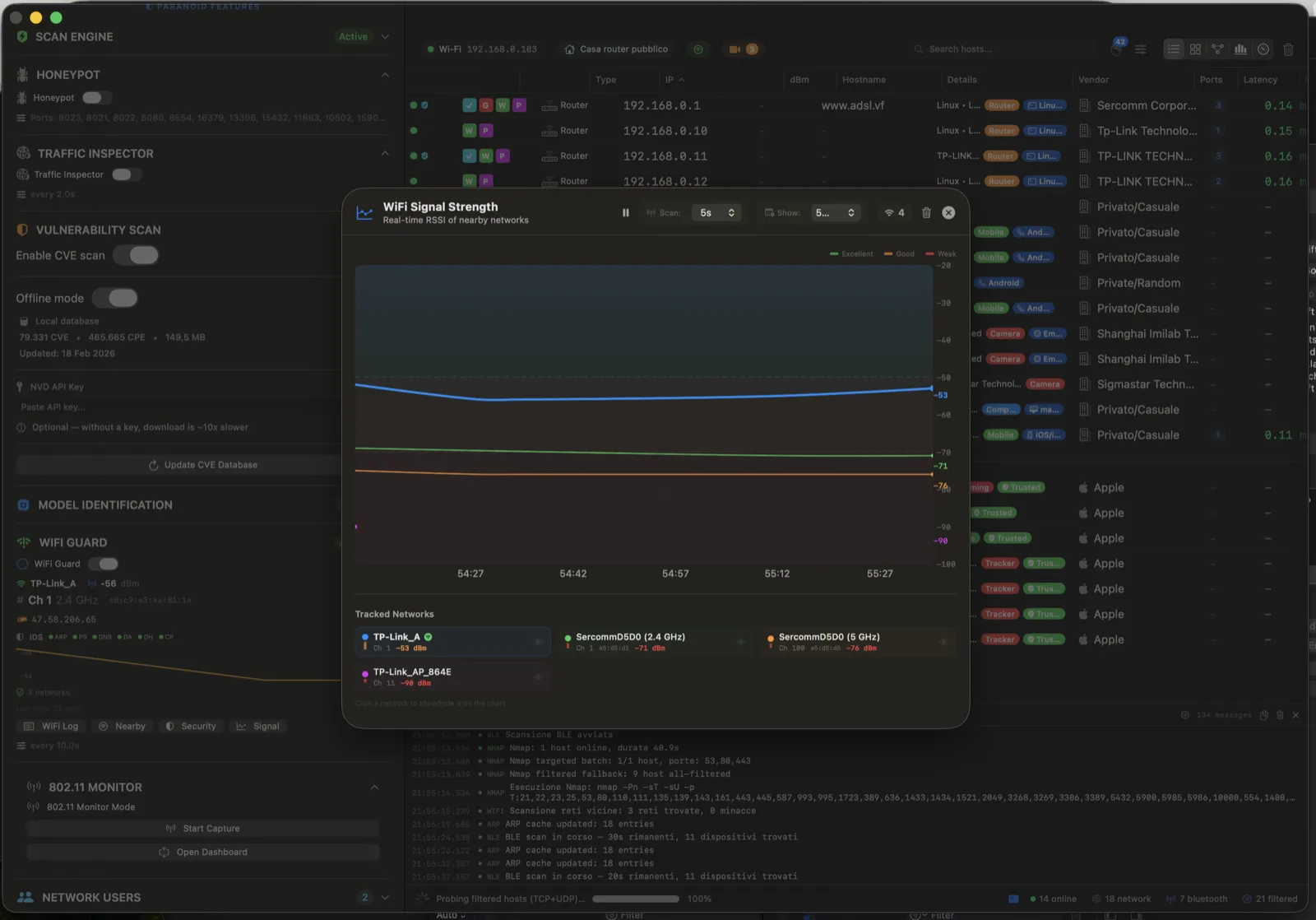
WiFi Guard continuously monitors your wireless connection every 4.5 seconds (configurable 0.5–5.0s) for the most dangerous WiFi-based attacks. It watches your BSSID, signal strength, gateway MAC address, and security protocol level simultaneously. A correlation engine requires at least two MITM indicators within a 30-second window before raising an alarm, eliminating false positives from normal WiFi roaming while catching real attacks. This is a practical layer of WiFi security monitoring for detecting Evil Twin access points, deauthentication abuse, ARP poisoning, and DNS tampering before credentials or session data are exposed.
💨 Deauthentication Attack Detection
Detects deauthentication flooding by correlating multiple disconnection events within a short timeframe (<30 seconds). This is the first stage of most WiFi attacks (Evil Twin, KRACK, PMKID capture).
CRITICAL
👻 Evil Twin Detection
Identifies rogue access points that clone your network's SSID. When Paranoid detects a BSSID change to an unknown access point (not in your trusted baseline), it immediately alerts you that you may be connected to an attacker's AP.
CRITICAL
🎭 ARP Spoofing Detection
Monitors the MAC address of your default gateway. If it changes unexpectedly, it means someone on the network is performing ARP spoofing to intercept your traffic (man-in-the-middle attack).
🌐 DNS Hijacking Detection
Detects when DNS responses are being poisoned or redirected. Compares DNS resolution results against known-good values to identify DNS spoofing attacks that redirect you to malicious servers.
📉 Security Downgrade Alerts
Monitors your WiFi security protocol level (WPA3 → WPA2 → WPA → WEP → Open). Any unexpected downgrade indicates a potential protocol downgrade attack forcing you onto a weaker, crackable encryption.
📶 RSSI Anomaly Tracking
Monitors signal strength variations. A sudden large jump in RSSI (>20 dBm) can indicate that you've been disconnected from a distant legitimate AP and connected to a nearby rogue AP. Configurable threshold.
✅ Baseline Learning
Saves trusted WiFi baselines (BSSID, channel, security level, gateway MAC) for your known networks. Future sessions compare against the baseline—any deviation triggers an alert.
📡 Nearby Network Scanning
Scans for all visible WiFi networks in your area, identifying potential threats, rogue access points, and channel congestion. Recommends optimal WiFi channels to minimize interference.
Monitor Mode transforms your wireless adapter from a normal client interface into a passive 802.11 sensor. Instead of seeing only your own traffic, Paranoid can observe nearby wireless activity at frame level to map access points, client behavior, broadcast probes, channel usage, and handshake events. This is essential for authorized wireless security auditing because it lets you inspect what is around you and what interacts with your devices in real time.
📻 Access Point Intelligence
Enumerates visible access points with BSSID, SSID, channel, signal level, security type, and beacon behavior. Quickly identify rogue APs, duplicated SSIDs, weakly configured networks, and suspicious infrastructure patterns.
🔍 Probe Request Analysis
Captures probe requests from nearby clients to reveal active network discovery behavior. Useful for understanding device movement patterns, preferred SSIDs, and potential privacy exposure in shared environments.
🚨 Deauth Event Visibility
Detects deauthentication/disassociation bursts and highlights abnormal event concentration. This helps identify disruption attempts commonly associated with wireless denial and pre-attack staging activity.
SECURITY
🔑 Handshake Capture Workflow
Captures and tracks handshake-related events for authorized testing workflows. Sessions are timestamped and organized so you can review capture context, channels, and involved clients without leaving the app interface.
PRO
🌀 Channel Strategy: Fixed or Hopping
Choose fixed-channel capture for focused analysis or channel-hopping mode for broader situational awareness. This supports both deep single-target troubleshooting and wide-area wireless reconnaissance.
👥 Client Mapping
Correlates observed client activity with nearby APs to show who is talking to what. Build a clear topology of wireless relationships and quickly spot unknown or unexpected clients around your environment.
📂 Session History
Stores monitor sessions for later review, comparison, and reporting. Historical captures help track recurring anomalies and support documentation for internal audits and incident follow-up.
⚠ Operational Safety
Paranoid warns when monitor sessions can temporarily affect active WiFi connectivity. This helps operators run controlled captures and avoid accidental disruption during production usage.
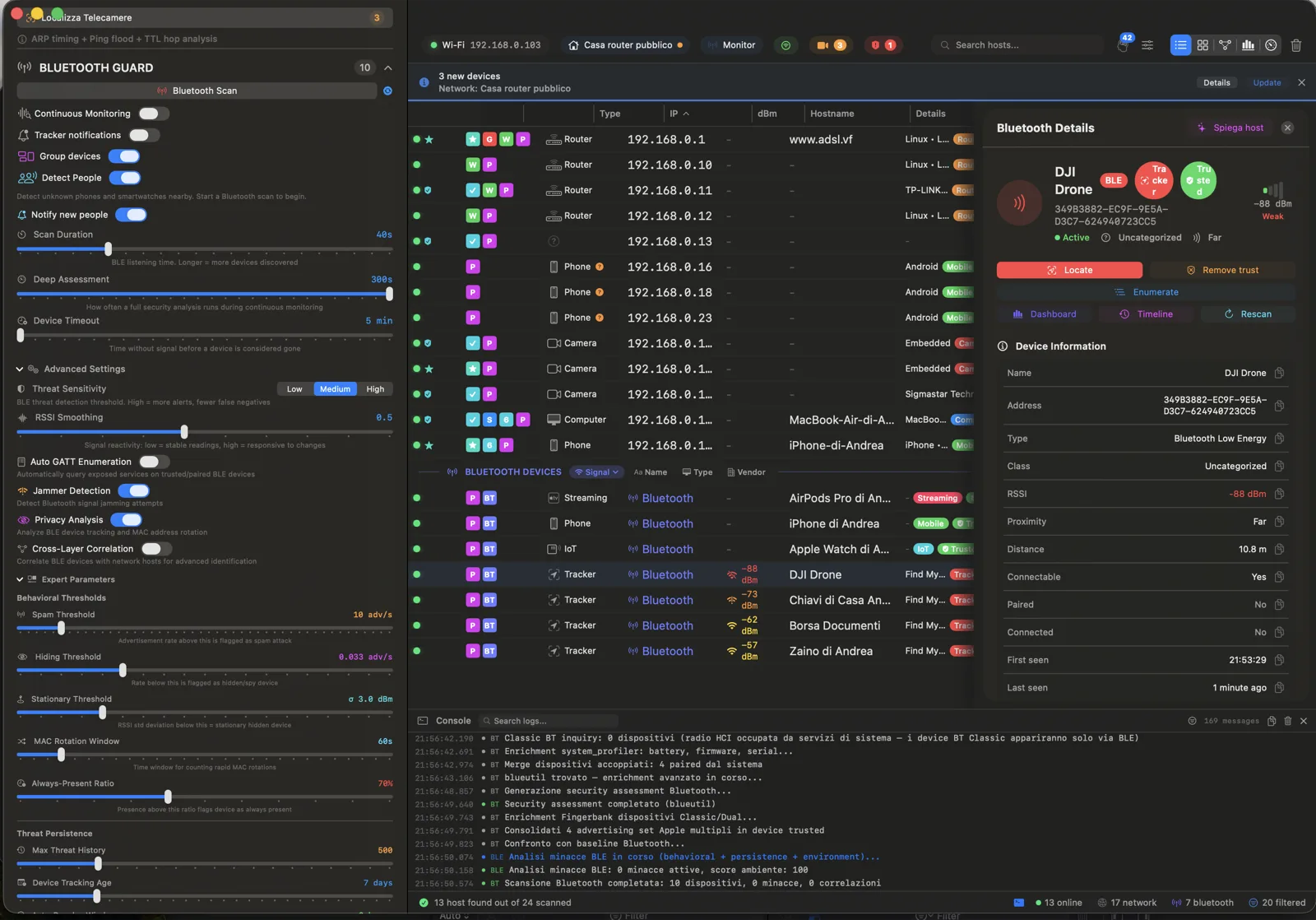
Bluetooth Guard scans for both BLE (Bluetooth Low Energy) and Classic Bluetooth devices in your vicinity, classifying them by type, estimating their distance, and assessing their security posture. It maintains a baseline of known devices and alerts you when unexpected devices appear—including tracking devices like AirTags, Tile trackers, and Pebblebee beacons that may be following you. The GATT service enumeration reveals exactly what capabilities each device exposes. For users concerned with physical privacy, this module acts as a dedicated Bluetooth tracker detection app for Mac and helps identify suspicious beacon behavior in offices, hotels, rentals, and shared spaces.
📱 Dual-Mode Scanning
Scans for both BLE (Bluetooth Low Energy) and Classic Bluetooth simultaneously. Discovers headphones, keyboards, fitness trackers, smartwatches, medical devices, IoT sensors, speakers, and all other Bluetooth-enabled devices.
📏 Distance Estimation
Estimates device proximity using RSSI and TX Power values: Immediate (<0.5m), Near (0.5-3m), Medium (3-10m), Far (>10m). Know exactly how close unknown devices are.
🔍 GATT Service Enumeration
Discovers and identifies 50+ known GATT service UUIDs: heart rate, blood pressure, location, battery, device info, health thermometer, and more. Reveals exactly what data each device is exposing.
🚨 Tracker Detection
Fingerprints tracking devices by their Bluetooth Company ID: Apple AirTags, Tile trackers, Pebblebee beacons, Samsung SmartTags. Alerts you if an unknown tracker is following you.
SECURITY
🛡 Security Assessment
Evaluates each device's security posture: legacy Bluetooth vulnerabilities, JustWorks pairing (no authentication), open GATT services, exposed health/location data. Flags risky devices.
📊 Baseline & Rogue Detection
Save a baseline of your known Bluetooth devices. On subsequent scans, any new device not in your baseline is flagged as a "rogue" with an alert. Continuous auto-scanning keeps your airspace monitored.
Paranoid uses a two-layer detection system to find IP cameras on any network, even when they're disguised or configured to avoid discovery. Layer 1 is brand-agnostic, using OUI lookups, hostname patterns, Bonjour services, SSDP analysis, and active RTSP/ONVIF/HTTP probing. Layer 2 activates deep, brand-specific detection with binary protocol fingerprinting for specific camera manufacturers. A weighted scoring system (0-100) provides confidence levels: Confirmed (≥60), Suspicious (30-59), and Unlikely (<30). If you are evaluating short-term rentals, offices, or public environments, this offers an advanced hidden camera detector workflow grounded in protocol evidence instead of generic heuristics.
🏭 Vendor OUI Database
Database of 35+ camera manufacturers' MAC address prefixes: Hikvision, Dahua, Axis, Reolink, Wyze, Ring, Nest, TP-Link, Ubiquiti, Amcrest, Lorex, Foscam, and many more.
🎬 RTSP Stream Detection
Probes RTSP protocol (port 554) with OPTIONS and DESCRIBE commands. Parses SDP (Session Description Protocol) responses to identify video codecs (H.264, H.265, MJPEG) and stream URIs.
📹 ONVIF Device Detection
Probes ONVIF-compliant cameras using the standardized web services protocol used by most professional IP cameras. Identifies manufacturer, model, and firmware version.
🧬 Binary Fingerprinting
Deep probing of vendor-specific protocols: Dahua (port 37777, 0xA0/0xA4 magic bytes), Reolink (port 9000, Baichuan 0x0ABCDEF0), XMEye (port 34567, 0xFF magic), RTMP (port 1935, 0x03 handshake).
DEEP SCAN
🌐 HTTP Media Endpoints
Scans 9 generic media paths (/video, /mjpeg, /snapshot.jpg, /live, etc.) and 10 brand-specific endpoints. Analyzes Content-Type headers to detect MJPEG streams, JPEG snapshots, and HLS feeds.
📊 Confidence Scoring
Aggregates weighted signals into a 0-100 confidence score. Multiple detections compound: OUI match + RTSP + ONVIF + HTTP media = near-certain camera identification. Results show Confirmed, Suspicious, or Unlikely.
Your router is the front door to your network, and most people have no idea what's exposed. Paranoid discovers your gateway via UPnP IGD (Internet Gateway Device) protocol, enumerates all port mappings (forwards) configured via UPnP, detects NAT-PMP support, and calculates a security score from 0 to 100 based on what services are exposed to the internet.
🔍 UPnP Gateway Discovery
Automatically finds your router using UPnP IGD protocol. Identifies the gateway model, firmware, and supported capabilities without requiring router login credentials.
📋 Port Mapping Enumeration
Lists every port forward configured via UPnP: internal/external port, protocol, target device, description, and lease duration. Many applications silently open ports—now you can see them all.
⚠ Exposed Port Alerts
Flags dangerous port exposures: SSH (22), RDP (3389), Telnet (23), SMB (445), database ports (3306, 5432), and other services that should never be internet-facing. Each flagged with risk severity.
SECURITY
📊 Security Score (0-100)
Calculates an overall router security score based on exposed services, dangerous port mappings, UPnP configuration, and NAT-PMP status. Provides actionable recommendations to improve your score.
Paranoid goes beyond listing devices—it identifies the people using your network. By analyzing hostnames, Bonjour names, NetBIOS names, and mDNS records, it extracts person names and associates them with their devices. Multi-source merging combines evidence from different protocols, and a confidence scoring system (High/Medium/Low) indicates how certain each identification is. Results persist across sessions so you build a complete picture of who has been on your network over time.
👤 Hostname Analysis
Extracts person names from common hostname patterns: "Andreas-MacBook", "iPhone di Marco", "DESKTOP-JOHN", "LisasiPad". Handles dozens of naming conventions across macOS, iOS, Windows, and Android.
🔗 Device-User Association
Links identified users to all their devices. See "Andrea" with their MacBook, iPhone, iPad, and Apple Watch—all grouped under a single identity with evidence from each device's hostname.
📊 Confidence Scoring
Each identification carries a confidence level based on the strength and number of signal sources. Hostname + Bonjour + NetBIOS all matching = High confidence. Single weak signal = Low confidence.
Paranoid integrates the IPGeolocation API to provide detailed geographic and threat intelligence for any IP address. Look up your public IP to see what the internet knows about you, or analyze external IPs to assess their risk. The security module detects VPNs, proxy servers, Tor exit nodes, and bot traffic, assigning a threat score from 0 to 100. All results are cached locally for 7 days to minimize API calls.
🌍 Geographic Location
Country, region, city, and precise coordinates (latitude/longitude) for any IP address. See where connections are coming from on a global scale.
🏢 ISP & ASN Data
Identifies the Internet Service Provider and Autonomous System Number for every IP. Spot connections from hosting providers, cloud infrastructure, or suspicious ISPs.
🕵 VPN / Proxy / Tor Detection
Identifies if an IP belongs to a VPN service, proxy server, or Tor exit node. Detects the proxy type (VPN, HTTP proxy, SOCKS, etc.) and identifies known anonymization services.
⚠ Threat Scoring
Each IP receives a threat score from 0 to 100, mapped to categories: Low (0-33), Medium (34-66), High (67-100). Based on abuse history, blacklist presence, and behavioral analysis.
🌐 Public IP Detection
Discover your external/WAN IP address, see your ISP information, and run a full security analysis on your own internet-facing address. Know what attackers see when they scan you.
🔎 External Host Analysis
Enter any public IP to perform a combined port scan + geolocation lookup. Useful for investigating suspicious connections, analyzing remote servers, or auditing external infrastructure.
Save a snapshot of your network as a "profile"—a baseline of all known, authorized devices. On every subsequent scan, Paranoid compares the current network state against your baseline and instantly flags any deviations: new unauthorized devices, missing devices, IP changes, MAC changes, and new open ports. This is the foundation of network intrusion detection—if you know what should be there, you can instantly spot what shouldn't.
💾 Profile Management
Save, name, and manage multiple network profiles. Keep separate baselines for home, office, and client networks. Each profile stores complete device inventory with MAC, vendor, ports, and device type.
🔄 Live Comparison
Automatically compares every scan against your active profile. New devices are highlighted in green, missing devices in red, and changed devices in orange—directly in the host table with diff indicators (+2 -1).
🚨 Unauthorized Device Detection
Any device not in your baseline is immediately flagged as unauthorized. Combined with macOS notifications, you'll know within seconds when a stranger joins your network.
The Network Monitor runs continuous background scans at configurable intervals, tracking device presence in real time. It uses a 3-miss threshold before marking any device as offline (preventing false alerts from momentary network hiccups). Combined with the automation engine, you can define rules that trigger webhooks, generate reports, or send notifications based on specific network events. The scan scheduler supports cron-like scheduling for unattended operation.
🔄 Background Scanning
Continuous network polling with configurable interval. Uses the same ARP snapshot pattern as full scans for accurate results. Merges discoveries into the main host table in real time.
🔔 44 Alert Types
Comprehensive alerting across all modules: network events (new device, IP change, unknown vendor), WiFi attacks, honeypot events, traffic anomalies, security findings, Bluetooth rogue devices, and more.
⚙ Automation Rules
Define IF-THEN rules: "IF new device joins THEN send webhook to Slack". "IF vulnerability found THEN generate report". Supports webhooks, email notifications, annotations, and automated reports.
⏰ Scan Scheduling
Schedule scans with cron-like flexibility: every hour, daily at midnight, weekdays at 9am, or custom intervals. Scans run automatically and save results as sessions for later review.